
1. See where you stand
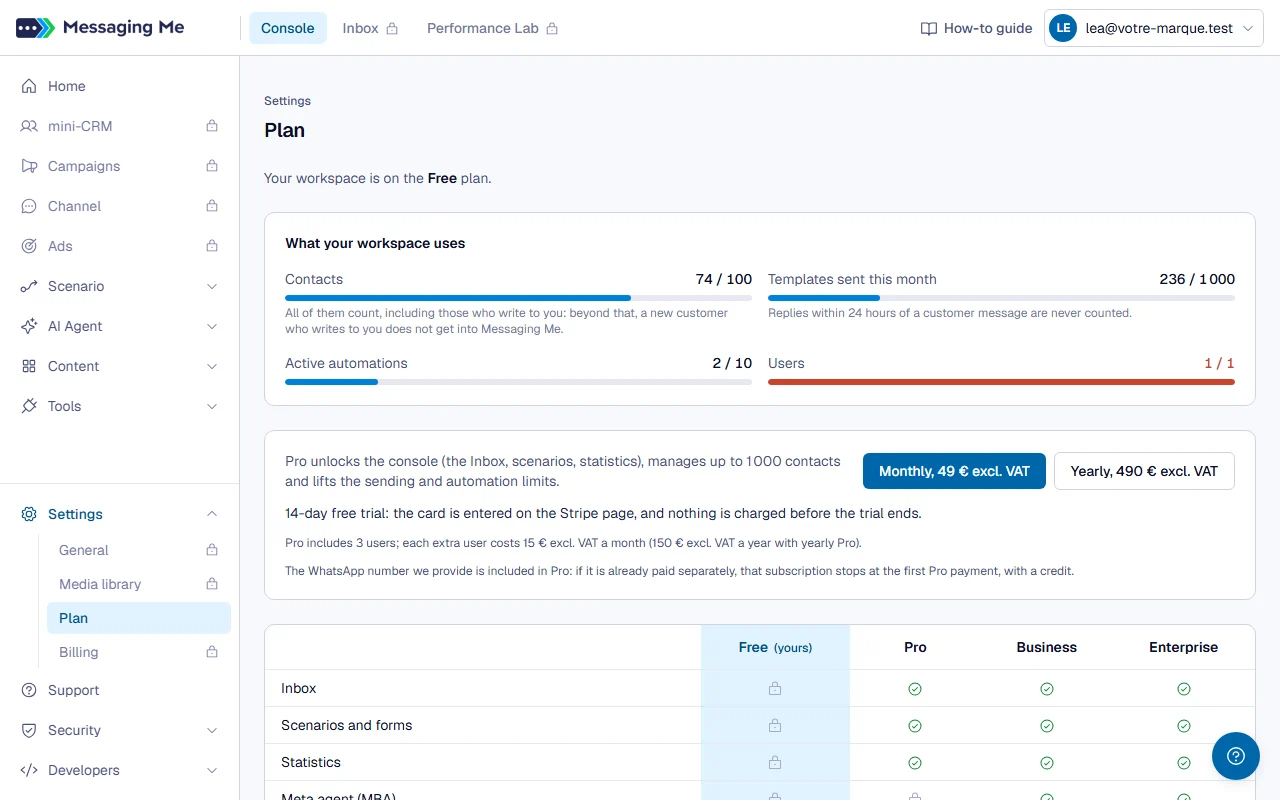
The Settings > Plan menu shows your plan, how much of each limit your workspace uses (contacts, templates sent this month, automations switched on, users), and the plans side by side. Outside Free, its second tab, AI credit, tops up the prepaid credit of your AI agents.
2. Upgrade to Pro
On the Plan page, choose “Monthly” or “Yearly”: you pay on Stripe’s secure page, where a promo code can be entered, and your workspace switches to Pro as soon as the payment is confirmed, usually within the minute.
In detail
If your workspace has never had Pro, it starts with a free 14-day trial: the card is requested, nothing is charged before the trial ends, and the Plan page shows the end date. If these buttons do not appear, “Upgrade to Pro” opens Support with the subject already filled in. Business and Enterprise are requested through Support, with “Contact us” on the Plan page: we set the plan on your workspace, with no online payment, and a 14-day Business trial is available on request.
3. Follow and cancel my subscription
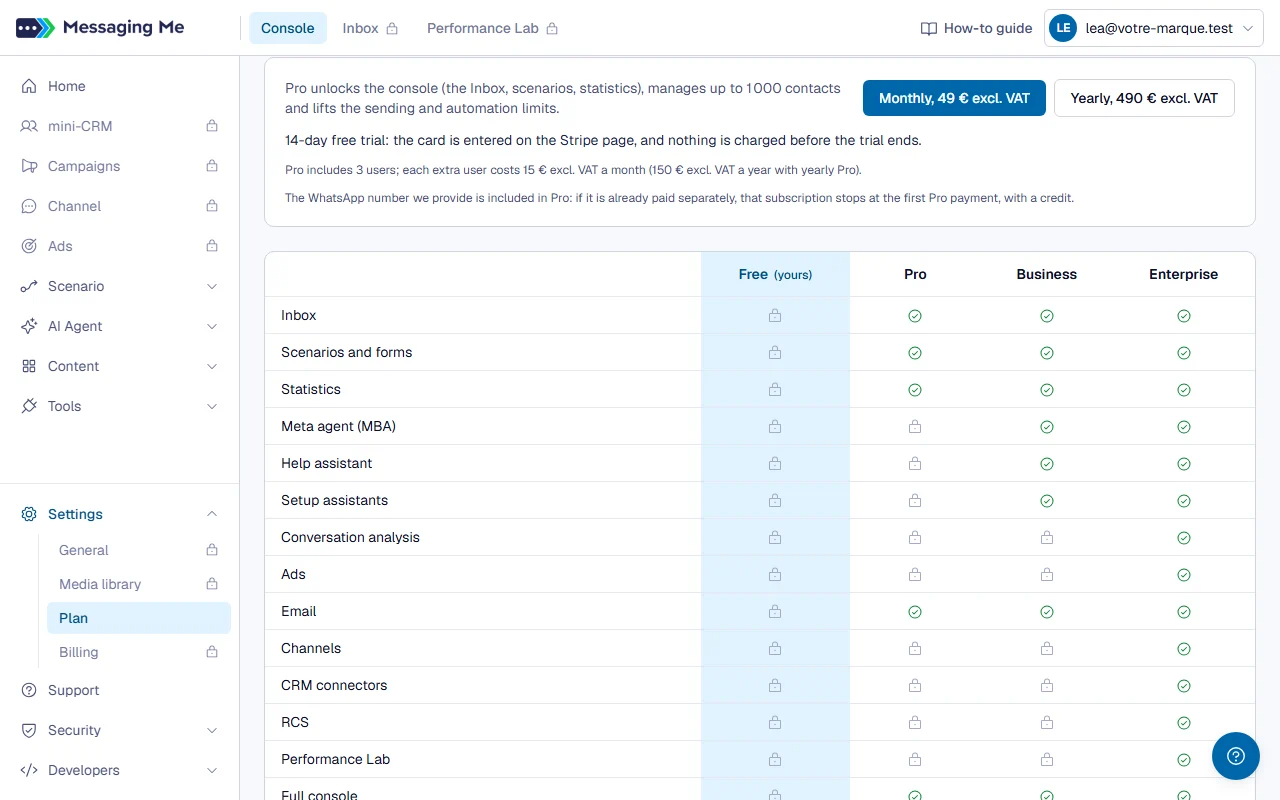
On Pro, the “Your Pro subscription” card, at the top of the Plan page, shows its status (active, free trial, payment overdue or cancellation scheduled), its billing and price, its start date, and its next renewal or its end date.
In detail
“Cancel my subscription” stops Pro at the end of the paid period, or of the trial without charging anything: the confirmation gives the exact date, and until that date “Keep my subscription” keeps it. “Change card” opens Stripe’s secure page.
To switch from monthly to yearly, write to us through Support. A cancellation refunds nothing: your workspace keeps Pro until the end date, then goes back to Free.
On Free, a number provided by Messaging Me has its own subscription: the “Your provided WhatsApp number” card, on the Plan page, opens Stripe’s page to change card or cancel it, at the end of the month already paid.
4. Find my invoices
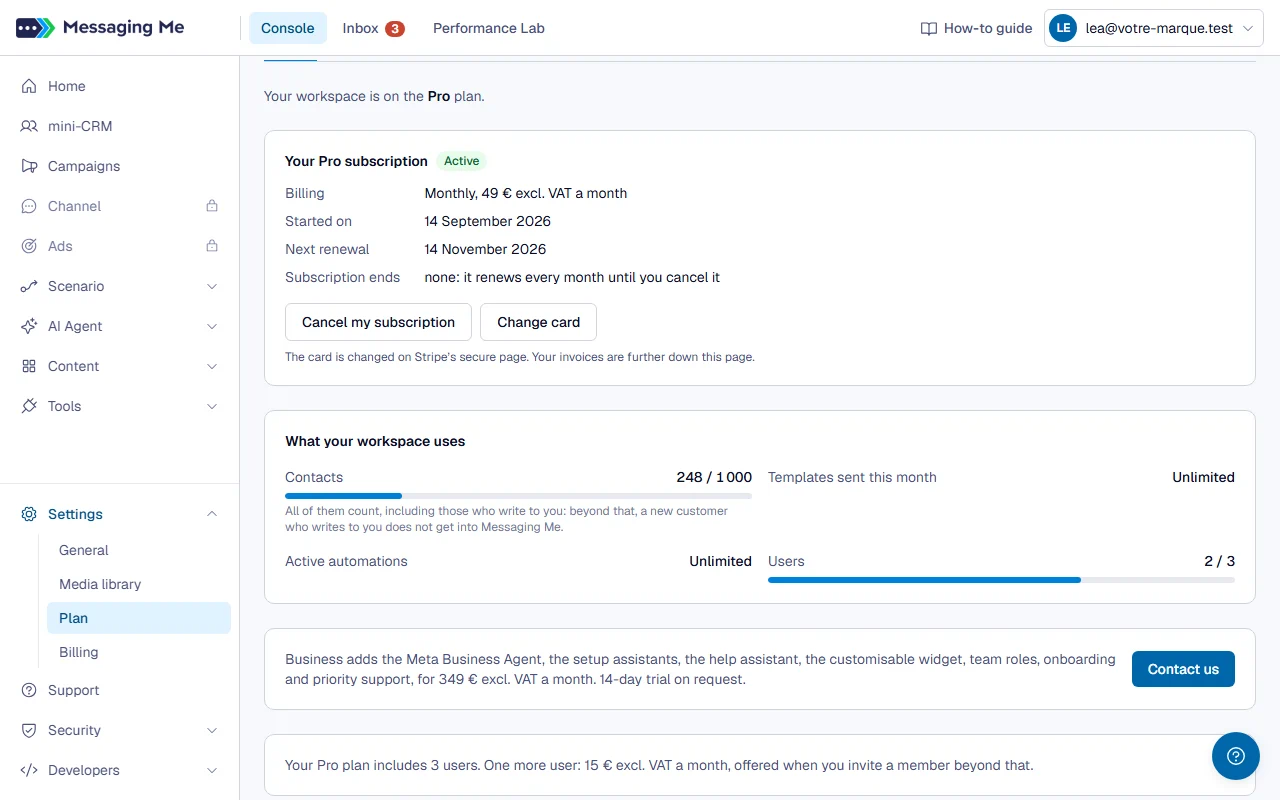
The Settings > Billing menu, like the Plan page, lists your workspace’s invoices: the subscription, the number, the credit line option and top-ups, the AI credit top-ups, with their amount and status. Each one opens on Stripe’s page, with its PDF.
What each plan includes
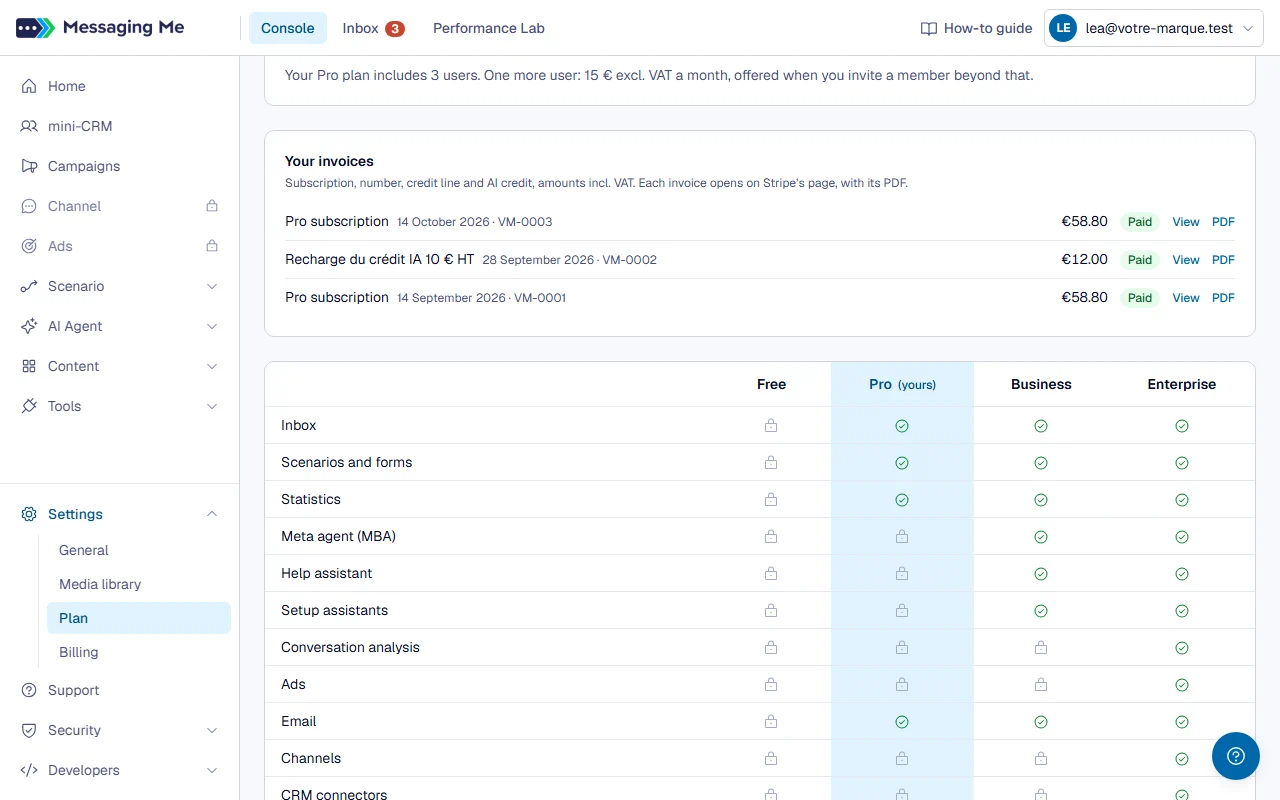
What the Free plan includes. Your WhatsApp number, the API and the connection to Claude, with caps: contacts, templates sent each month, a single user. Claude and the API read your conversations, reply to your customers within 24 hours, send your templates and build your AI agent. In the console, Free keeps the Home screen (your number), the API keys, the documentation, the plan, your account and support.
What Pro, Business and Enterprise add. Pro opens the console: the Inbox, scenarios, statistics, email and the assistant that builds your AI agent, with more contacts. It includes three users, all administrators: beyond that, each extra user is paid for, and its price is shown when you invite the member, before anything is billed. The Plan page removes one, without a refund, once the extra member is deactivated. Business adds the Meta Business Agent, the help assistant, the customisable widgets with no limit on their number, and team roles (administrator, manager, agent), with five users, onboarding and priority support; an extra user is requested through Support. Ads, channels, RCS, Salesforce and Batch, and the full Performance Lab require Enterprise.
What the contact limit counts. On Free, Pro and Business, all your contacts count, including those who write to you first. When your workspace is full, creating or importing a contact is refused, and a new customer who writes to you does not get into Messaging Me: their message is not recorded and your AI agent does not reply to them. An email lets you know, at most once a day. Your existing contacts write to you as before, and a deleted contact frees its place: ask Claude to delete the ones you no longer need. On Enterprise, the number of contacts is agreed with you, and a contact who writes to you first is never refused.
On Business and Enterprise: delete the oldest instead of refusing. In Settings, the box "When the workspace is full, the oldest contact makes room" lets each new contact in by permanently deleting your oldest contact, with its conversation, messages and analysis. No contact is protected. Before an import, the preview says how many of the oldest will be deleted.
Add 1,000 contacts on Pro. On the Plan page, "Add 1,000 contacts" costs €20 excl. VAT a month with the monthly plan, €240 excl. VAT a year with the yearly one. The prorated amount until the end of your period is charged right away on the Pro card, and your limit goes up as soon as that payment is accepted. "Remove 1,000 contacts" refunds nothing and deletes no contact: delete the extra ones first.
WhatsApp widgets. One on Free, five on Pro, no limit on Business and Enterprise. A workspace that has more than its plan allows keeps its own, which keep working: only creating a new one is refused.
What is never counted. A reply sent within 24 hours of a customer’s message is not a template send: it is not counted.
When something is not in your plan. The menu stays visible, greyed out, with a padlock: it takes you to the Plan page. If an action is refused because a limit is reached, a message tells you so, with a “See plans” button.
How long your conversations are kept. 30 days on Free, 60 days on Pro, 90 days on Business; on Enterprise, the duration agreed with you. A shorter duration only applies 30 days after entering the plan (when the workspace is created, when your Pro ends, when you leave Business or Enterprise): changing plan deletes nothing on the spot.
If your workspace goes back to Free
Nothing is deleted, and everything comes back when you take Pro again. Meanwhile, only your 10 oldest automations still start their scenarios (your widgets no longer start theirs), Meta’s agent no longer takes new conversations, and members beyond the Free plan’s limit have their access suspended (the oldest administrator keeps theirs): as soon as the workspace is back on Pro, “Retry” gives them the console back. All your contacts stay, even beyond the Free plan’s limit: as long as there are too many, you can no longer create or import any, and a new customer who writes to you does not get in.
An email, the Plan page and Claude tell you how many to delete to get back to the limit. Ask Claude to delete them, in one go, and a few more to let new customers in: the oldest, or those with a tag. It first shows you how many there are and a few records, and only deletes once you agree. As long as your workspace is above its limit, these deletions are not capped per day.
Your provided number
It is included in Pro, Business and Enterprise: get it at no cost from the “Connect WhatsApp” page. If it was already paid for separately, that subscription stops at the first Pro payment, with a credit on the next invoice. If you cancel Pro, the Plan page and an email warn you: when Pro ends, the number moves to €3.50 a month on the same card. To give it back instead, choose “Give back my number when Pro ends” on the Plan page; you can change your mind as long as Pro is running. If you send through your own number, the provided number does not resume: it is released seven days after Pro ends.